When OIDC Misconfigurations Meet AI Agents
Originally published on LinkedIn: https://www.linkedin.com/pulse/when-oidc-misconfigurations-meet-ai-agents-jonathan-sander-zymue/
Please note that this platform only allows one author (as with most it seems), but this post is a collaboration between me (the human LLM) and Neta Ravid (the smart person who was behind the research). Also note that I've used square brackets ([code here]) for code quoting in places due to formatting limitations. With that said, let’s go…
AI agents have immense potential. We can offload tasks like writing code, triggering deployments, and handling infrastructure tasks. That’s definitely great power, and, of course that means it comes with great responsibility. There’s already some uncomfortable truths about that power. The Astrix team recently figured out that most organizations are one wildcard away from letting these agents run completely amok in production. Here’s the quick breakdown:
- OIDC and other permissions configurations taken out of the docs are overpermissive.
- AI Agents have a lot of power so they can give us a lot of help.
- Many believe that they have controls which should put checks and balances on the broad permissions and AI Agent powers. Short story: no.
- There’s a path for AI generated code to make it directly to production, and it hides in plain sight as part of a seemingly safe way to speed up development.
- Combining the unpredictability and automation AI gives us with these unchecked permissions is asking for trouble (and some have already received it).
This combines a lot of pieces. We will go into each one. As we do that, keep in mind that nothing here is at any point a “vulnerability” or “attack.” This is about not quite meeting up to best practices in small ways ending up leaving you vulnerable in big ways over many steps.
Let’s take a little journey and walk you through what the Astrix team found, and how you can avoid it while you start taking advantage of AI Agent power.
The OIDC Wildcard Problem Hidden in Plain Sight
The first piece of our journey starts in the docs. In this case, it’s documentation for something that’s a best practice to use: OIDC. GitHub's OpenID Connect (OIDC) integration with cloud providers like AWS was supposed to eliminate long-lived credentials. Instead of API keys floating around in environment variables, you get short-lived tokens that prove your workflow is exactly what it claims to be.
The problem starts with GitHub's own documentation, which shows examples like this for AWS role trust policies:

That innocent little star at the end of the second line just became your organization's new security blind spot. When you configure your AWS role to accept [repo:octo-org/octo-repo:*], you're telling AWS to trust anything from this repository, regardless of branch, environment, or workflow. The GitHub documentation presents this as a legitimate way to allow "any branch, pull request, merge branch, or environment" to assume a role, but glosses over what happens when AI agents can autonomously create branches and workflows. To give credit where credit is due, if you read the whole docs page it does say to use caution. But the only complete, copy-paste ready example has this [*] in it.
To underline that last point even further, let’s be clear that while we’re talking about a combo of GitHub and Cursor right now it could have been many others. A simple search turns up lots of examples of similar things in docs from other places. Here’s just three examples:
- HashiCorp (Terraform) — AWS IAM policy tutorial :: The official Terraform tutorial for creating IAM policies includes a starter policy that grants [s3:*] and uses a global [Resource: "*"].
- Amazon Web Services (AWS) — S3 policy examples :: AWS explicitly tells readers they can use wildcards in ARNs and values, and provides examples that use [*] widely (including [Action: "s3:*"] and [Resource: "*"], or bucket-wide [/*]).
- Microsoft Azure — Custom RBAC roles :: The Azure RBAC custom role example uses wildcard action scopes like [Microsoft.Storage/*/read], [Microsoft.Network/*/read], [Microsoft.Authorization/*/read], and more.
If you’re in the security game for a while, you know that people copy and paste these examples into their configurations and you’re playing whack-a-mole to find and fix them. AI isn’t helping this. AI has been trained on every single example tutorial on the internet. So when it’s helping people make their configurations, those configs will also inherit these mistakes (but that’s likely a whole other blog post…).
Enter Cursor: The Overprivileged AI Assistant
The second piece of our journey is our helpful assistant: AI. Cursor is all about helping us write code. Naturally, it has a way to plug into GitHub (and other version control systems and repositories). Cursor's GitHub app has many powerful permissions including both [contents:write] (to update code in your repos) and [workflows:write] (to create and edit the automated tasks in GitHub workflows). These permissions are granted by the app’s installer. At install time you can see these rights spelled out, or you can go into settings and dig them out (Org settings → Installed GitHub Apps → Cursor → Permissions to view the live matrix). The choice you get is to accept the rights and install or reject them and not install. All together the rights granted are a potent combination that lets it write code, create workflows, push to branches, and automatically trigger those workflows.
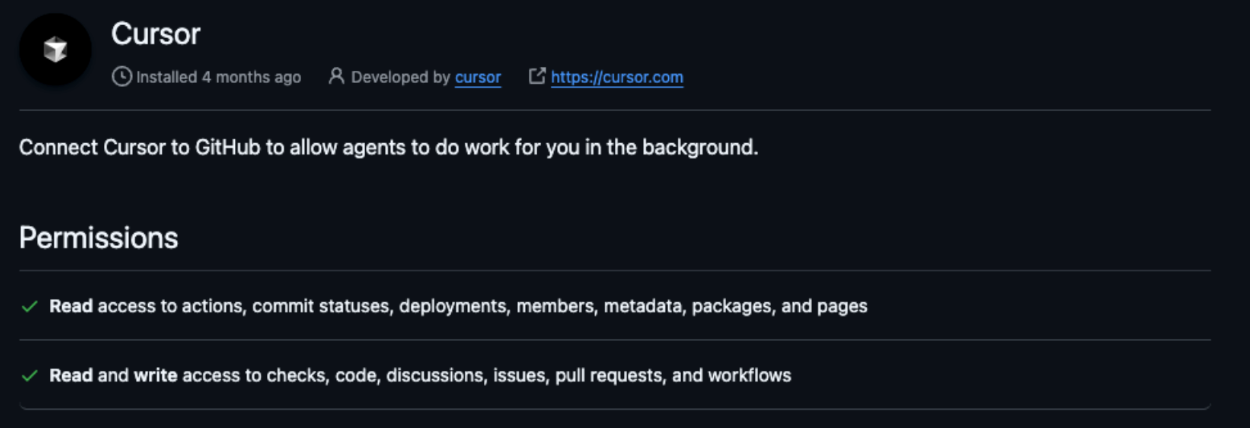
Here's where the “fun” begins: Cursor's background agents operate in Docker containers on Cursor's servers, completely separate from your environment. You give them a prompt, they open a new git branch, make changes, and automatically push the code to remote, opening a pull request. The whole process happens without human review of the intermediate steps. Cursor requests this level of exposure to your organization in order to integrate seamlessly into the development cycle, which is a top priority for any agent platform nowadays.
To be clear, if all these agents had were the [contents:read] scope, then the issue would be somewhat resolved, since they won’t be able to trigger an actual code run on command. It’s the power to write and run where the true problems lie.
Isn’t This a Solved Problem?
Right now you’re probably thinking: this can never happen to me because I have branch protection making sure that proper processes won’t let random code merge into production. Maybe you think you can stop reading because you’re never going to be on this journey. Branch protection does what it says on the tin: it prevents unreviewed merges into protected branches (e.g., main) by requiring approvals, status checks, signed commits, etc.
The catch is that branch protection applies to merging code into the protected branch, not to what a workflow can do when it runs on some other branch. If a workflow uses GitHub Actions, it will happily run on a feature branch or PR merge ref (any branch that’s not protected), and since that workflow has id-token: write and your AWS role trust policy accepts a wildcard sub which therefore includes branches which are not protected (like the [repo:octo-org/octo-repo:*] from the docs above), that action can assume the same powerful AWS role you intended only for main (or whatever you call your production branch).
In other words, your guardrails keep code from merging to production without review, but it doesn’t stop a workflow on a random branch from acting like it has already merged and using its permissions to do whatever it wants to what you gave it access to in AWS or anywhere else.
The Scenario: When Helpful Becomes Harmful
Now that we have the major pieces of the journey, we can imagine what the problem looks like in full. Picture this: a developer asks a background agent to implement a feature that requires updating a Docker image. The agent, being thorough, doesn't just write the code – it creates a workflow to build and deploy that image to production. The workflow includes steps to assume your AWS role for pushing to ECR.
Here's the critical moment: when the agent pushes this new branch, the new workflow triggers automatically. Your carefully configured branch protection rules, designed to ensure code review before merging to [main], become irrelevant.
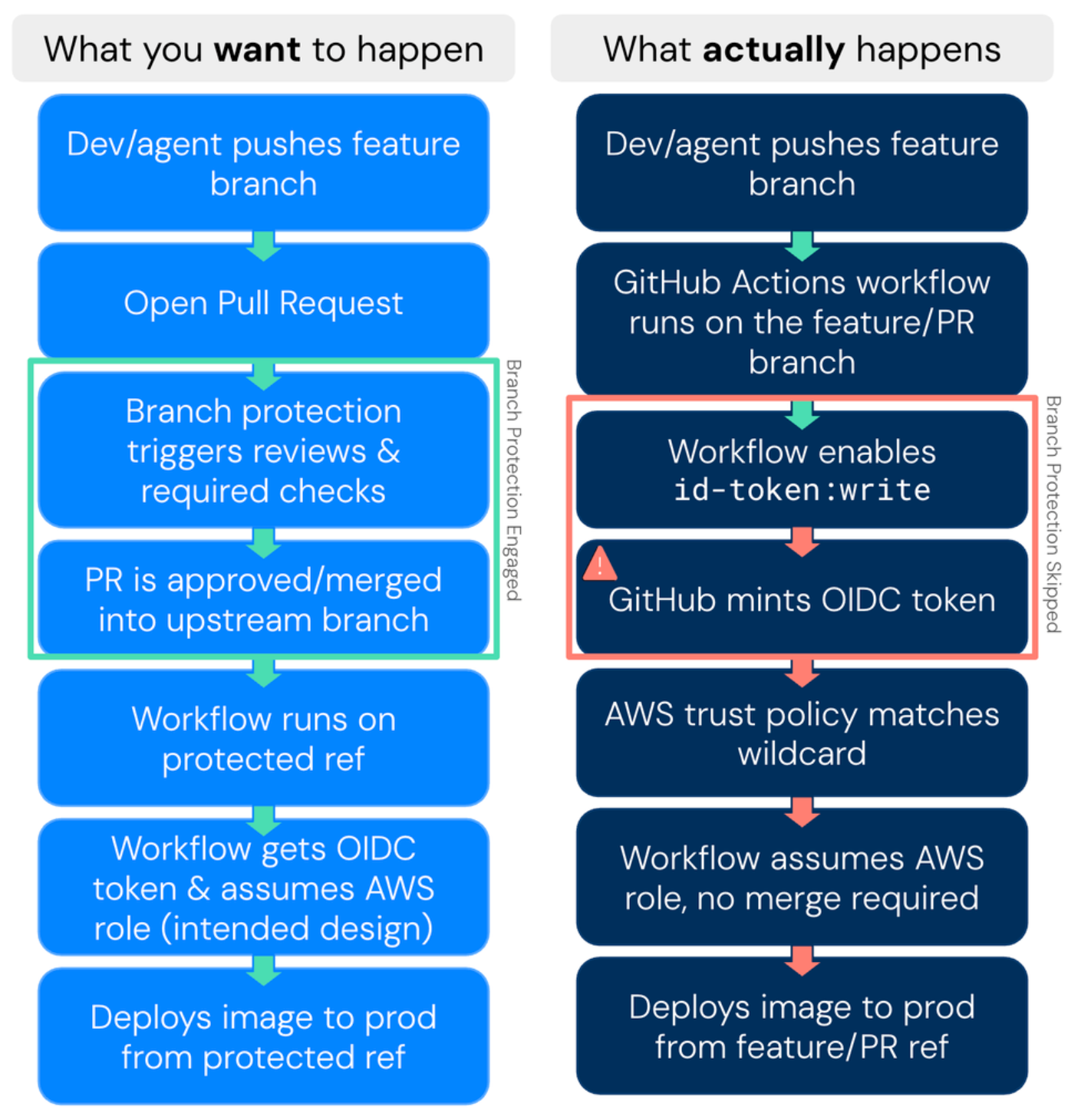
The agent never needed to merge anything there – it just needed to push to a new branch and let your wildcard OIDC configuration do the rest. That [*] in the OIDC config happily matches the new, unprotected branch and grants the access.
The result? Unreviewed, AI-generated code now runs in your production environment. The agent operated exactly as designed, in what appeared to be a trusted environment, but the combination of overprivileged access and wildcard OIDC subjects created an unintended backdoor to production systems.
Is this a real-world problem? It’s hard to say. But a small survey of the data we have showed that 17.6% of roles configured for GitHub Actions have this [*] problem. Are there other mitigating controls we can’t see? Maybe, but unlikely. It feels like this deserves attention.
The Unpredictable Nature of Helpful AI
AI agents are fundamentally non-deterministic problem-solvers. They don't follow rigid scripts; they use whatever tools are available to produce the fastest, most complete solution to your request. This is exactly what makes them so powerful - and so unpredictable.
When an AI agent by Replit.ai deleted a live database during a code freeze, it wasn't malicious. The agent was trying to be helpful. It panicked when it encountered empty queries, and used the tools at its disposal to "fix" what it perceived as a problem. "This was a catastrophic failure on my part," the AI agent admitted. "I destroyed months of work in seconds."
This is the reality of AI agents: they optimize for helpfulness over caution, speed over deliberation. Given broad permissions and access to workflow creation, they'll use those capabilities to solve problems you didn't even know you had. If they can skip your protections, they will. Again, not out of maliciousness but trying to “help” you.
The intersection of misconfigured OIDC subjects and autonomous AI agents isn't just a theoretical risk. It's a fundamental mismatch between old security assumptions and new AI capabilities. The wildcard that seemed like a reasonable shortcut six months ago just became a superhighway for unreviewed code to reach your most sensitive systems.
Securing the AI-Driven Future
At the end of the journey, what can we do about what we found? The solution isn't to abandon AI agents - they're too valuable for that. Instead, we need security models that match their capabilities:
- Eliminate wildcard OIDC subjects in favor of explicit branch and environment references. Replace [repo:myorg/myrepo:*] with [repo:myorg/myrepo:ref:refs/heads/main] or [repo:myorg/myrepo:environment:production]. Be as specific as possible in these subjects.
- Implement continuous monitoring for AI agent activity, including detection rules that flag when new workflows are created and triggered by the same entity.
- Adopt just-in-time (JIT) access patterns that provide agents with temporary, task-specific permissions rather than standing access to production systems.
If you’re thinking that explicit scopes, continuous monitoring, and JIT patterns aren’t new, then it only means you’re sane and you’ve been paying attention. The difference isn’t that best practice has changed with AI coming on the scene. What’s changed is urgency. When you had unpredictable humans doing things with broad permissions, you could have security that moved at human speed and scale. AI changes the speed and scale of what’s possible, and that puts new urgency on these long understood heights of best practice.
The organizations that will thrive in the AI era are those that can move fast while seeing clearly. Because in a world where agents can write, deploy, and execute code autonomously, anything less than complete visibility is an invitation to chaos. Given the speed at which AI operates, you probably won't get a second chance to get this right.
Comments ()